
Error Establishing A Database Connection
“Error Establishing a Database Connection” occurs when your WordPress website can’t connect and retrieve information from the database. Its common causes include misconfigurations in the wp-config file, invalid credentials, or corrupted data.
If left alone, this database problem can harm your website’s uptime and usability. But don’t worry – we’re here to help you identify the root issue and resolve this error quickly.
This WordPress tutorial will explain all about “Error Establishing a Database Connection,” its possible causes, and tried-and-true solutions. We’ll also explore the best practices to prevent this error from happening again.
Error Establishing A Database Connection message in WordPress typically indicates that WordPress is unable to connect to your site’s database. Here’s how to troubleshoot and fix this issue:
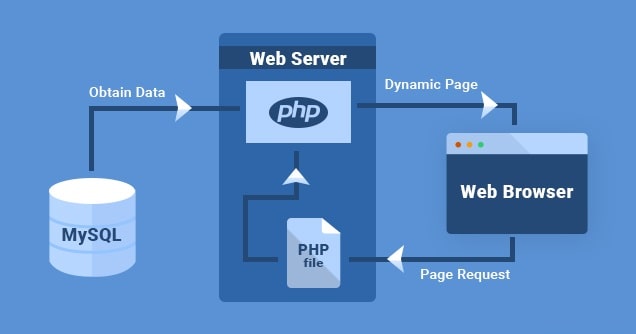
- Check Database Credentials:
- Verify that the database credentials (database name, username, password, and host) in your WordPress configuration file (wp-config.php) are correct. You can find this file in the root directory of your WordPress installation.
- Check Database Server:
- Make sure that the database server is running and accessible. You can try accessing the database using a database management tool like phpMyAdmin or MySQL Workbench to confirm connectivity.
- Repair WordPress Database:
- Sometimes, the database may become corrupted, causing connection issues. You can repair the WordPress database using the built-in repair tool. Add the following line to your wp-config.php file:
php
define('WP_ALLOW_REPAIR', true);
- Then, access the following URL in your browser:
arduino
http://yourdomain.com/wp-admin/maint/repair.php
- Replace “yourdomain.com” with your actual domain name. Follow the on-screen instructions to repair your database.
- Sometimes, the database may become corrupted, causing connection issues. You can repair the WordPress database using the built-in repair tool. Add the following line to your wp-config.php file:
- Check Database Server Resources:
- Ensure that your database server has enough resources (CPU, memory, disk space) to handle incoming connections and queries. Insufficient resources can lead to database connection errors.
- Ensure that your database server has enough resources (CPU, memory, disk space) to handle incoming connections and queries. Insufficient resources can lead to database connection errors.
- Restart Database Server:
- If you have access to the database server, try restarting it to see if that resolves the issue. Sometimes, a server restart can fix temporary connectivity issues.
- Check Database Prefix:
- If you’ve changed the database prefix in your WordPress configuration file (wp-config.php), make sure it matches the prefix used in your database tables. Mismatched prefixes can cause connection problems.
- Check for Plugins or Themes Issues:
- Temporarily deactivate all plugins and switch to a default WordPress theme (e.g., Twenty Twenty-One). Then, check if the error persists. If it disappears, reactivate plugins and themes one by one to identify the culprit.
- Contact Web Hosting Support:
- If you’re still unable to resolve the issue, contact your web hosting provider’s support team for assistance. They can check server logs and provide further guidance on troubleshooting database connection issues.
- If you’re still unable to resolve the issue, contact your web hosting provider’s support team for assistance. They can check server logs and provide further guidance on troubleshooting database connection issues.
By following these steps, you should be able to diagnose and fix the “Error Establishing A Database Connection” issue in WordPress.
