
DNS (Domain Name System) is a hierarchical and distributed naming system that translates human-readable domain names into IP addresses.
It acts as a decentralized phonebook for the internet, allowing users to access websites, send emails, and perform other network-related activities using familiar domain names.
How DNS Works:
- User Enters a URL:
- When a user enters a URL (e.g., www.example.com) into a web browser, the browser needs to find the corresponding IP address to connect to the server hosting that website.
- Local DNS Resolution:
- The local device checks its cache (local DNS cache) to see if it already has the IP address for the requested domain. If found, the process skips the next steps.
- Recursive DNS Server:
- If the IP address is not in the local cache, the device queries a Recursive DNS Server (also known as a resolver). The recursive server is responsible for finding the IP address by traversing the DNS hierarchy.
- Root DNS Servers:
- If the recursive server doesn’t have the IP address, it starts the DNS resolution process from the root DNS servers. These servers are authoritative for the top-level domains (TLDs) like .com, .net, .org.
- TLD DNS Servers:
- The root DNS server directs the recursive server to the TLD DNS server responsible for the specific top-level domain (e.g., .com). The TLD server, in turn, directs the resolver to the authoritative DNS server for the second-level domain.
- Authoritative DNS Server:
- The authoritative DNS server holds the information about the IP address of the requested domain. It responds to the recursive server with the correct IP address.
- Response to the User:
- The recursive server caches the IP address and sends it back to the user’s device. The device also caches the IP address for future use.
- Establish Connection:With the IP address, the user’s device can establish a connection to the server hosting the requested website or service.
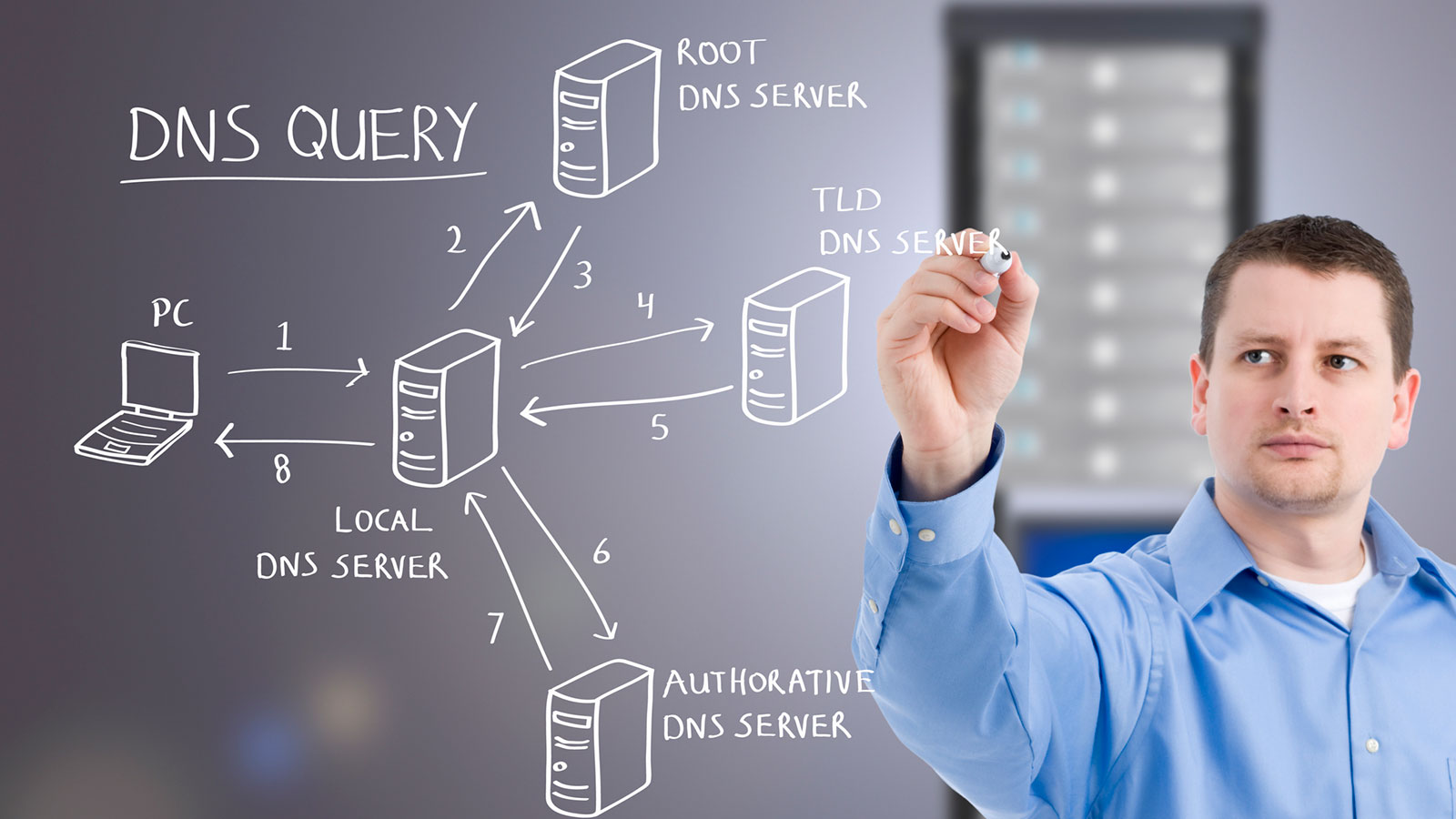
How DNS works – Key Components of DNS:
- DNS Resolver:
- Software or service on a user’s device or network that initiates DNS queries and caches the results.
- Root DNS Servers:
- Thirteen authoritative servers at the top of the DNS hierarchy. They direct queries to the appropriate TLD DNS servers.
- TLD DNS Servers:
- Servers responsible for specific top-level domains (e.g., .com, .org). They direct queries to the authoritative DNS servers for the second-level domains.
- Authoritative DNS Servers:
- Servers that store and provide DNS information for a specific domain. They respond to queries with the IP addresses associated with domain names.
DNS Records:
- A Record (Address Record):
- Maps a domain to its corresponding IPv4 address.
- AAAA Record:
- Maps a domain to its corresponding IPv6 address.
- CNAME Record (Canonical Name):
- Alias of one domain to another.
- MX Record (Mail Exchange):
- Specifies mail servers responsible for receiving emails for a domain.
- TXT Record (Text):
- Contains arbitrary text, often used for DNS verification and authentication.
- PTR Record (Pointer):
- Used for reverse DNS lookups to map an IP address to a domain.
How DNS works – What are the steps in a DNS lookup?
For most situations, DNS is concerned with a domain name being translated into the appropriate IP address. To learn how this process works, it helps to follow the path of a DNS lookup as it travels from a web browser, through the DNS lookup process, and back again. Let’s take a look at the steps.
Note: Often DNS lookup information will be cached either locally inside the querying computer or remotely in the DNS infrastructure. There are typically 8 steps in a DNS lookup. When DNS information is cached, steps are skipped from the DNS lookup process which makes it quicker. The example below outlines all 8 steps when nothing is cached.
How DNS works – The 8 steps in a DNS lookup:
-
- A user types ‘example.com’ into a web browser and the query travels into the Internet and is received by a DNS recursive resolver.
- The resolver then queries a DNS root nameserver (.).
- The root server then responds to the resolver with the address of a Top Level Domain (TLD) DNS server (such as .com or .net), which stores the information for its domains. When searching for example.com, our request is pointed toward the .com TLD.
- The resolver then makes a request to the .com TLD.
- The TLD server then responds with the IP address of the domain’s nameserver, example.com.
- Lastly, the recursive resolver sends a query to the domain’s nameserver.
- The IP address for example.com is then returned to the resolver from the nameserver.
- The DNS resolver then responds to the web browser with the IP address of the domain requested initially.
Once the 8 steps of the DNS lookup have returned the IP address for example.com, the browser is able to make the request for the web page:
- The browser makes a HTTP request to the IP address.
- The server at that IP returns the webpage to be rendered in the browser (step 10).
In summary, How DNS works is a critical component of the internet infrastructure, translating human-readable domain names into machine-readable IP addresses, enabling seamless communication and access to online resources.
